
FAQ’s
Following are few of the points which will help to debug the issue.
1) Enable debug by adding following in your wp-config.php file before /* That’s all, stop editing! Happy blogging.
define(‘WP_DEBUG’, true);
define(‘WP_DEBUG_LOG’, true);
define(‘SCRIPT_DEBUG’, true);
define(‘SAVEQUERIES’, true);
And then try to activate the plugin again. This will create a debug.log under wp-content folder. Check for cf7 google sheet connector error if so send us the file at helpdesk@www.gsheetconnector.com
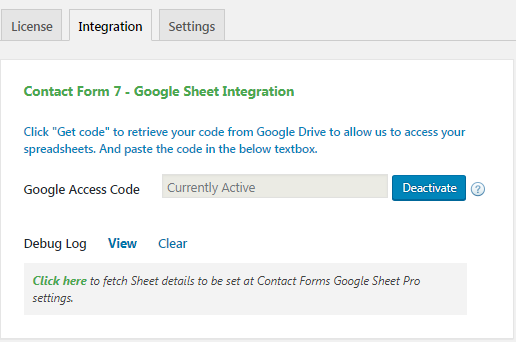
2) Check the log that is created by CF7 google sheet. For that click “View” from goggle sheet integration page. Let us know if there is any error we will assist you.
3) Check what other CF7 extension you are using. Deactivate one by one and check if there is any conflict.
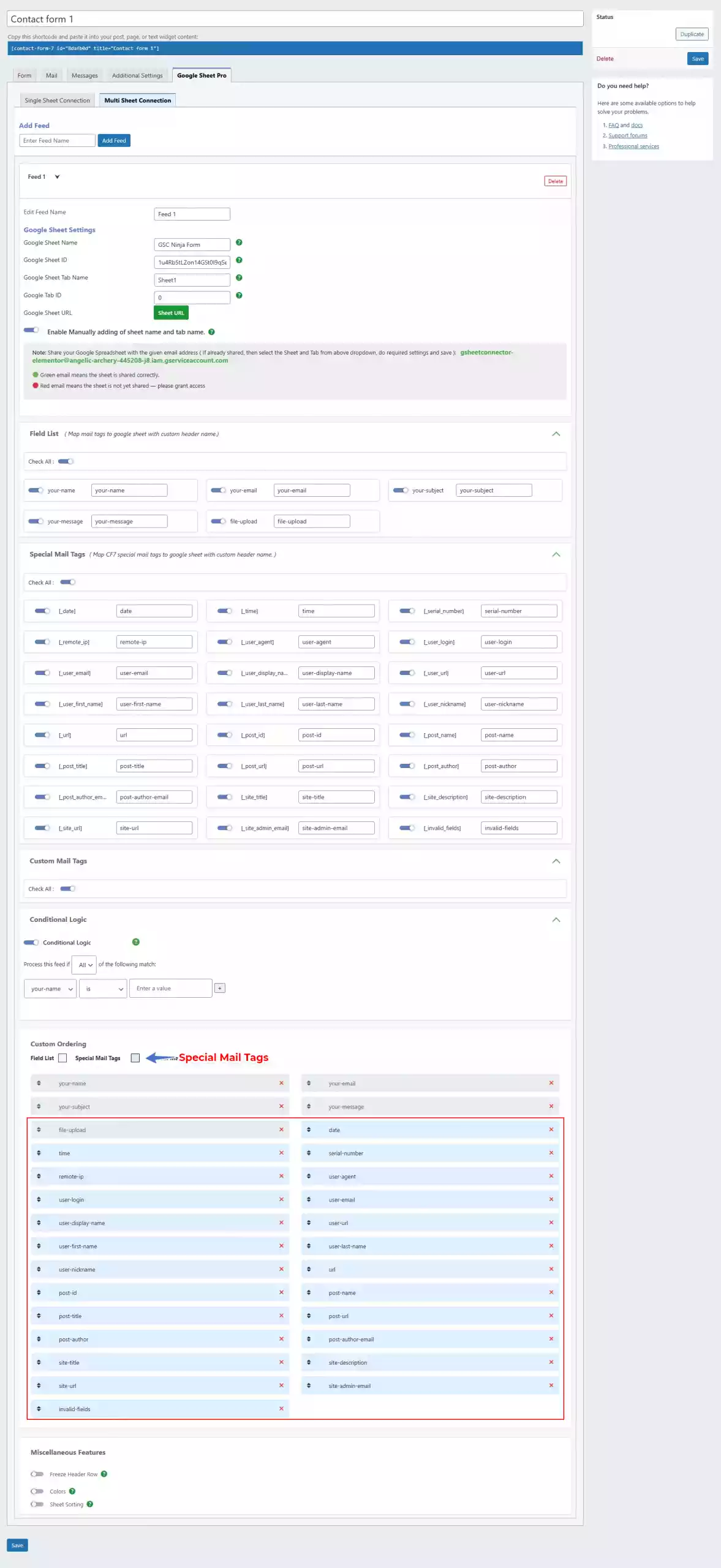
- Go to the Current Working Contact Form7 and edit it.
- Then click on the Google Sheet tab.
- Choose the Google Sheet name and Google Sheet tab name inside the Google Sheet tab.
- Mark the Field you want in Google Sheet and name the field’s header.
- The field you mark will by default create a column in google sheet.
- Mark the Special Field you want in Google Sheet. refer the documentation
- On the
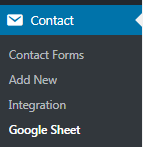
Admin Panel > Contact form 7 > Google Sheetsscreen, click the “Get Code” button. - In a popup Google will ask you to authorize the plugin to connect to your Google Sheets. Authorize it – you may have to log in to your Google account if you aren’t already logged in.
- On the next screen, you should receive the Access Code. Copy it.
- Now you can paste this code back on the
Admin Panel > Contact form 7 > Google Sheetsscreen.
Sometimes it can take a while of spinning before it goes through. But if the entries never show up in your Sheet then one of these things might be the reason:
- Wrong access code ( Check debug log )
- Wrong Sheet name or tab name
- Wrong Column name mapping ( Column names are the contact form mail-tags. It cannot have underscore or any special characters )
Please double-check those items and hopefully getting them right will fix the issue.
Yes, Absolutely! We offer a demo where you can explore the PRO features.
You can refer to this demo links
WooCommerce Google Sheet Connector
Google Sheet Connector for Contact Forms
CF7 Google Sheet Connector
WPForms Google Sheet Connector
Gravity Forms Google Sheet Connector
Ninja Forms Google Sheet Connector
Forminator Forms Google Sheet Connector
Formidable Forms Google Sheet Connector
Fluent Forms GSheetConnector
JetFormBuilder GSheetConnector
Page Builder Contact Forms
Elementor Forms Google Sheet Connector
Avada Forms Google Sheet Connector
Divi Forms Google Sheet Connector
Also you can contact our support team or email us to decide if the plugin meets your needs.
In a WordPress multisite setup, each subsite where you activate the plugin requires its own license. However, we offer special multisite license packages designed for cost efficiency and easier management.
Example Scenarios:
-
For Multisite Integration Across All Subsites:
If you have more than 6 sites in your multisite network and want to integrate all of them with GSheetConnector, you’ll need the Business Plus license package. This package includes 10 licenses, ensuring seamless integration across all subsites.
-
For Selective Integration on Specific Subsites:
If your multisite setup consists of 7 sites but you only want to integrate 3 of them with GSheetConnector (while the other 4 sites do not use the plugin), the Business license package with 3 licenses will be sufficient. The remaining sites can continue functioning without Google Sheet integration.
Each subsite that uses GSheetConnector must have its own license, whether the integration is applied to all or only a few subsites within your network.
No, localhost or staging URLs used for testing and development purposes do not count against your license usage. We encourage testing the plugin in development environments to ensure smooth integration.
Yes! We offer a flat 10% discount on renewals for GSheetConnector addon plugins, depending on current promotions. You can take advantage of this discount within two weeks of your license expiring.
If auto-renewal is enabled, your subscription will be automatically renewed unless canceled.
If you choose not to renew your license, the plugin will continue to function. However, you’ll lose access to updates, new features, and premium support, which could impact compatibility with future WordPress versions.
What’s Your Refund Policy?
-
Refund Requests:
We offer refunds if requested within 14 days of purchase.
-
Technical Issues:
Refunds for technical issues are only provided after we’ve had the opportunity to assist you. If we cannot resolve the issue, a refund will be processed. Please contact our support team before requesting a refund for technical issues.
-
Support Assistance:
If you experience an issue, reach out to our support team with a detailed explanation. Our technical team will work to resolve it. If we cannot resolve the issue, a refund will be issued.
-
No Refund for Change of Mind:
Refunds will not be provided if you decide not to use the plugin after a few days.
For more details, please refer to our refund policy.
Yes! We offer professional services through the parent company, WesternDeal Web Solution.
The serial number is supported using Flamingo Addon Plugin.
Make sure you are using this plugin before using special mail tag of contact form 7
CF7 Google Sheet Connector is an Addon Plugin for WordPress Contact Form 7 which is known as CF7.
Before using CF7 Google Sheet Connector, it must be required to use Contact Form 7
Yes, you can upgrade your license. Cost-based proration will charge you the difference between your current subscription and the price of the upgrade.
For example:
If you purchased a Single Site license for Product A for $39 on October 1, 2022, and upgrade to a 3 Sites license for $99 on March 1, 2023, you will pay the difference of $60 for the upgrade. On October 1, 2023, your subscription will renew at $99 for the 3 Sites license, and your license key will be valid until October 1, 2024.
Yes, you can deactivate the license from the current site and use it on another. Here’s how to do it:
- Go to My Account settings page.
- Navigate to Purchase History tab
- Click on View Licenses.
- Select the site where the license is currently activated and click Deactivate License.
Note:
- Once a license is deactivated, it can be activated on a new site.
- There’s no need to manually add the site in the account settings. When you activate the license on a new site, it will automatically appear in your account.
For any queries or assistance you can contact our support team or email us.
Yes, we pay our affiliates every time they accumulate earnings of at least $200. If we were to send payouts at the time of each individual sale, the number of transactions for both you and us would quickly get out of hand.
Not necessarily, however, we do advise using CF7 GSheetConnector, WPForms GSheetConnector, and Gravity Forms GSheetConnector because the more you familiarize yourself with GSheetConnector PRO, the easier it will be for you to make an honest recommendation and showcase it in your content, YouTube videos, etc.
Sometimes it can take a couple of takes for a customer to make their purchase. However, we’ll make sure that a referral will be attributed to your account if they make a purchase for 60 days.
As a result of our refund policy – following that grace period, we’ll pay you within 30 days (assuming you do meet the minimum payout threshold)
No, you do not need a website to promote GSheetConnector and use our affiliate program. If you are doing paid marketing, email marketing, or guest blogging – you can apply to be an affiliate.
Yes, you will get access to our affiliate dashboard where you can track your campaigns, monitor stats, and watch your earnings grow.
No, you cannot use your own link to make a purchase. Your purchase will not be eligible for the commission.
Absolutely. We recommend doing that and you will be eligible for earning a commission. Referring someone to get the GSheetConnector PRO versions is a great way of earning extra money from an existing client.
GSheetConnector offers a range of plugins designed for various contact forms, page builder forms, and eCommerce platforms, including:
Contact Forms:
Page Builder Forms:
eCommerce Platforms:
Our pro plugins significantly enhance the functionality of these forms by seamlessly sending form submissions to Google Sheets with improved accuracy and ease. They ensure compatibility and provide a smooth integration process. For a detailed overview of each plugin’s features, including screenshots, demos, and a comparison between the free and pro versions, visit the product page: GSheetConnector Plugins
Do You Provide Support?
Yes, we provide comprehensive support. When you subscribe and purchase our plugins or addons, you gain full access to our documentation, tutorials, and support system. To receive technical support, an active license is required to post a support ticket. If your license has expired, you can renew it from your account page. New licenses can be purchased from the plugins section. We offer support for issues such as bugs, viruses, or file corruption.
With GSheetConnector, the process of finding and shortlisting suitable Developers for WordPress, setting up the interview shall take only seven business days. Additionally, making the hiring decision and the onboarding process can take anywhere from one to two weeks, depending upon the skills and experience.
We have an exhaustive gathering process with clients to understand their needs. Moreover, we conduct a vetting process for talent to get an in-depth understanding of their capabilities. This process helps us with the right matchmaking of talent and clients.
While we will share relevant profiles of Developers for WordPress with you, you will be interviewing the candidates and making the final selection before you hire a Developer for WordPress.
Every developer who applies at GSheetConnector has to go through a 5 stage assessment, which includes – Communication Test, an Aptitude test, a Technical MCQ test, a Live Coding test, and a final Technical Interview round.
The full-time hiring of a developer for WordPress from us will cost you approximately $1500 a month which is subjective to the skill set and experience of the candidate.
We at GSheetConnector have a curated talent network of remote developers for WordPress who are capable enough to pull off any tasks related to WordPress including Web Design, Web Development, Ongoing Maintenance, Theme Development, Plugin Development, and many more.
There are many ways to find a reliable developer for WordPress. You can start by searching online for developers or professionals with extensive experience on job sites. It’s also helpful to check references and contact past clients of the developers you’re interested in hiring. Additionally, getting in touch with Talent networks like GSheetConnector can be a great way to find top-rated developers for WordPress.
A proficient Developer for WordPress should be familiar with the following:
- Skilled in HTML, CSS, and JavaScript
- Experience with PHP and MySQL
- Knowledge of WordPress themes and plugins
- Ability to troubleshoot technical issues
- Understanding of responsive design principles
- Familiarity with version control systems such as Git
- Ability to work with popular web hosting solutions
- Experience with theme customization
- Knowledge of web accessibility standards
- Understanding of coding standards and best practices
To shortlist programmers for WordPress, consider factors such as experience, technical proficiency, availability, and client reviews. It’s important to find a developer that offers the services you need within your budget. Luckily, GSheetConnector takes over the legwork for you so that you can focus on more important things.
You should hire a developer for WordPress if you want to create a website or blog that is highly customized, user-friendly, and feature-rich. Additionally, a developer for WordPress can create a website or blog that is optimized for search engine optimization (SEO). They can also help you create a secure website or blog free from malicious attacks.
Additionally, they can help you troubleshoot any issues you may have and make any necessary changes or improvements to keep your website or blog running smoothly.
With GSheetConnector, you will get the best pre-vetted developers for WordPress in the industry. Our vetting process selects only the top 3.5% of developers to be a part of the network, making sure that you get connected to only highly skilled talent. With our fast hiring process and 2X retention rate, you can rest assured that you are getting reliable and long term results. Furthermore, hiring developers for WordPress from GSheetConnector is up to 40% cost-advantageous when compared with traditional recruitment practices. And we also offer a 2 week risk-free trial period so that you can assess our talent’s performance prior to making any commitments.
They are pre-vetted. It means that every candidate you interview has excellent communication skills and is technically among the top developers for WordPress in India.
They get certified through our talent network, which has a rigorous vetting process, and only the top 3.5% make it to our platform.
Yes, you can hire a team of Developers for WordPress from GSheetConnector. Our Talent network consists of professionals for WordPress who can help you develop and customize your WordPress website. They possess the required expertise to provide high-quality development solutions for WordPress.
Our transparent pricing model provides a clear breakdown of costs, ensuring you know exactly what you’re paying for. We eliminate hidden fees and offer customizable solutions tailored to your needs.
You can connect Elementor Forms to Google Sheets using the Elementor Forms Google Sheet Connector plugin. It allows you to securely authenticate your Google account and automatically send form submissions to your selected spreadsheet.
Yes, all Elementor form submissions are instantly synced to Google Sheets in real time as soon as a form is submitted.
Yes, the plugin supports automatic field mapping with toggle controls, allowing you to enable or disable specific fields and manage how data appears in Google Sheets.
No, this Elementor Forms Google Sheet Connector works without any coding. You can configure everything directly from your WordPress dashboard.
Yes, with multi-feed settings, you can send Elementor form submissions to multiple Google Sheets or different tabs within the same spreadsheet.
You can refer to the step by step documentation to configure multiple feeds from Elementor Google Sheet Connector plugin settings
Yes, file uploads such as images and PDFs are stored as accessible links in Google Sheets.
Yes, the plugin uses secure Google API authentication methods, including OAuth and service account authentication, ensuring safe and reliable data transfer.
Yes, you can easily sync previously submitted Elementor form entries to Google Sheets.
Yes, you can apply conditional logic to control when and how form data is sent to Google Sheets.
You can store all Elementor form fields, including text inputs, dropdowns, hidden fields, dynamic tags, and file upload links.
The plugin provides three secure authentication methods in the Integration tab to connect your Google account with Google Sheets:
- One-Click (Pre-Authorized) Authentication – The easiest method to get started. It allows you to securely connect your Google account using a pre-authorized and verified connection, ensuring quick setup without manual configuration.
- Manual Authentication (OAuth) – Recommended for Google Workspace (organization) accounts. This method involves creating your own Google API credentials for full control and compliance. You can follow the step-by-step documentation to configure it properly.
- Service Account Authentication – Ideal for advanced use cases. This method uses a JSON key file to authenticate and is useful for automated or server-to-server connections. It can also be used with personal Gmail accounts for a stable and controlled setup.


