We’re thrilled to announce the CF7 GSheet Connector 4.1.1 Released with several notable updates.
Here is the summary of changes.
1.4 =
- Enhancement – Provided Custom Ordering of fields and saved Google Sheet headers accordingly.
- Enhancement – Provided deactivation of authenticated account.
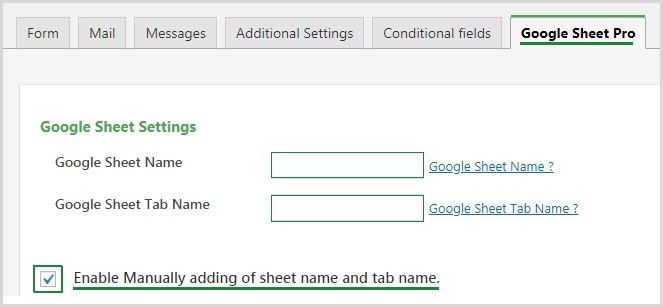
- Enhancement – Provided option to add sheet name and tab name manually.
- Added new special mail tags as per contact form 7.
- Changed Google Auth Libraries for making compatible with other plugins.
- Fixed – Not displaying of mail tags when put between html tags.
- Fixed – File upload rewrite with same file name.
- Done UI changes.
Custom Ordering
Now Drag and drop the mailtags for arranging columns for google sheet, no need to change the columns from sheet directly, instead you can arrange from plugin ordering section.
Make sure, if old data is already filled up, then need to arrange from google sheet.
Also if you selected fields are not showing, then check and uncheck it again, it may happens, if upgrade script is not executed correctly.
Select the Checkbox to Enable and Disable
Mostly, Google Account have too many sheets, so some user was having and issue with fetching the files in dropdown, so we have added a feature for adding filenames and tab names manually too.
Deactivate Option in Integration Tab
We have added deactivate auth option, if you want to switch the google account from one account to another. Make sure, it will work with once google account at a time, so make sure you are authentication with the right email account.
Also, if you have issue with authenticate, then use the private window and re-authenticate with the new key.
File upload rewrite with same file name.
In file upload option, there was an issue with the same filename upload. we have fixed it.
Other Notable Edits
- Fixed – Upgrade issue for multisite wordpress setup.
- Errors for license validation
- Priorities Contact Form validation before sending data to Google Sheet.
Share This Story, Choose Your Platform!
 How to Style Contact Form 7 Forms in WordPress (Updated)
 CF7 GSheetConnector Update to 1.4.2
About the Author: Abdullah Kaludi