
Before you set up CF7 Google Sheet Connector, it’s a good idea to quickly check whether your server and website meet the basic requirements. Most WordPress websites won’t run into any compatibility issues, but a quick check now can save you troubleshooting time later.
If you’re new to the plugin, we recommend starting with the Introduction to CF7 Google Sheet Connector first, then come back here before installation.
Quick Requirements Checklist
- Minimum PHP version 7.4 — the latest stable PHP release is recommended.
- Minimum WordPress version 5.6 — GSheetConnector supports WordPress 6.3.1 and all upcoming versions.
- Latest version of Contact Form 7 installed and active.
- HTTPS must be enabled on your website.
- cURL must be enabled on your server.
- Email SMTP must be enabled from your hosting provider.
- Updated Google API Client Version: v2.12.6
- Guzzle HTTP Version: Upgraded to Guzzle 7.4.3
PHP Version
GSheetConnector needs a reasonably up-to-date version of PHP to work correctly. You don’t need the absolute latest release, but running a very old version isn’t going to cut it.
The minimum supported PHP version is 7.4. Even WordPress itself recommends using at least PHP 7.4 for better speed and security.
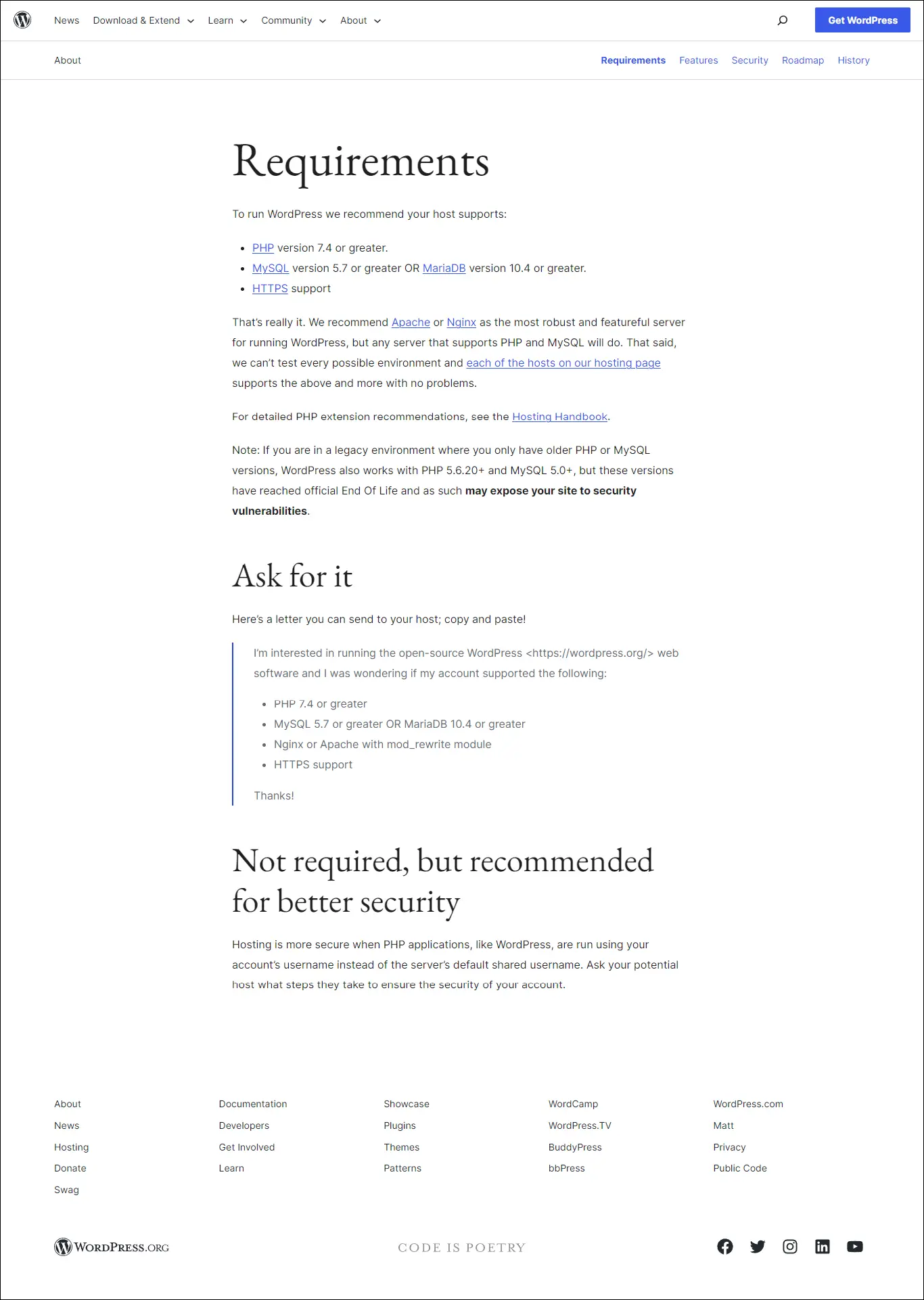
If your PHP version needs an update, WordPress will usually show you a notice right inside your dashboard.

There are a couple of good reasons to keep PHP updated rather than sticking with an older version:
- Older PHP versions are no longer supported by the PHP team, meaning no more security patches or performance fixes.
- Newer PHP versions run significantly faster, even under heavy traffic, so updating can noticeably improve your site’s performance.
WordPress Version
Keeping WordPress updated isn’t just about getting new features — it’s also a major security factor. Outdated WordPress installs are one of the most common ways websites get hacked, so regular updates matter.
GSheetConnector supports WordPress 5.6 and above, but we always recommend running the latest available version for the best experience.
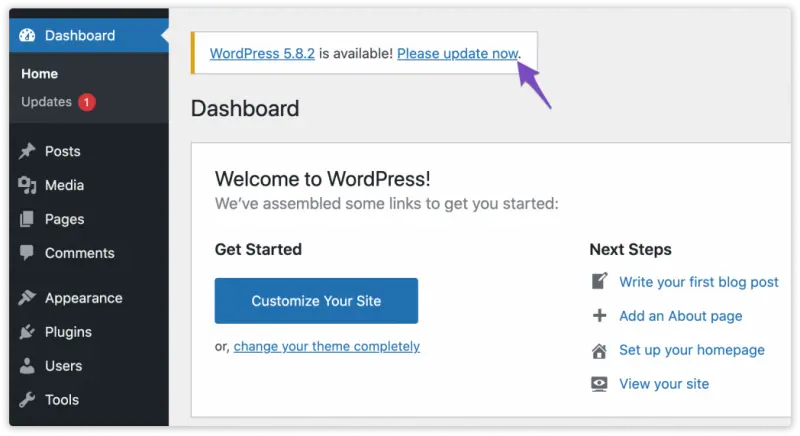
To check for updates manually, go to Dashboard → Updates.

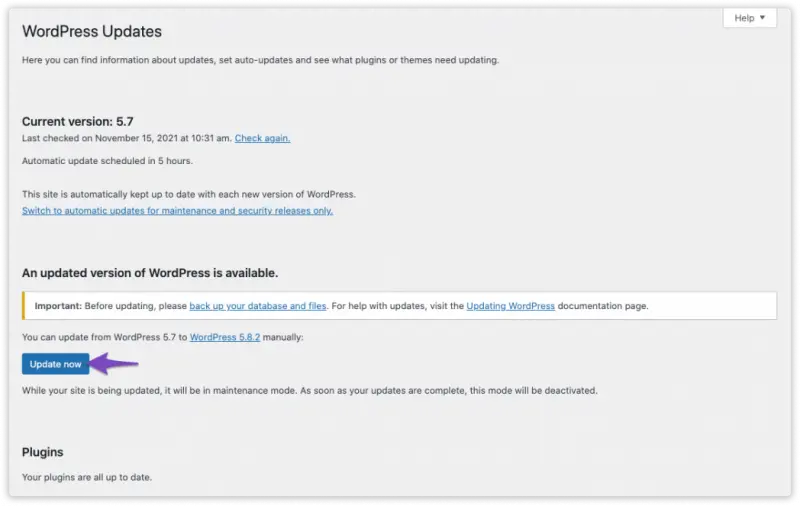
On the Updates page, click the Update Now button and wait for the process to finish.
Contact Form 7
Since GSheetConnector is built as an addon for Contact Form 7, keeping CF7 updated is just as important. It ensures you get the full feature set, better performance, and stronger security.
Outdated plugins, including Contact Form 7, can become an easy target for security vulnerabilities. GSheetConnector is compatible starting from Contact Form 7 version 5.6, but we strongly recommend always running the latest version for the best experience.
Updating Contact Form 7 is simple and can be done directly from your wp-admin → Plugins page in a couple of clicks.
What’s Next?
With your requirements confirmed, head over to the Installation Process – FREE Version or Installation Process – PRO Version guide to get CF7 Google Sheet Connector up and running.
Frequently Asked Questions
What is the minimum PHP version required for GSheetConnector?
GSheetConnector requires at least PHP 7.4. For the best performance and security, we recommend running the most recent stable PHP release your hosting provider offers.
What is the minimum WordPress version supported?
GSheetConnector supports WordPress 5.6 and above, including all newer releases such as WordPress 6.3.1 and beyond. Keeping WordPress updated is always recommended.
Do I need Contact Form 7 installed before using GSheetConnector?
Yes. CF7 Google Sheet Connector is an addon plugin, so you must have Contact Form 7 version 5.6 or above installed and active on your website.
Does my server need cURL and HTTPS enabled?
Yes. GSheetConnector requires cURL to be enabled and HTTPS to be properly configured on your server to securely connect and sync data with Google Sheets.
Why is Email SMTP required from my hosting provider?
Email SMTP needs to be enabled so that notification emails and certain plugin processes can be delivered reliably. Most hosting providers have this enabled by default, but it’s worth confirming with your host.
I use another plugin with an older Google API version — will it cause issues?
It might. Older plugins built on outdated GuzzleHTTP or Google API Client versions can sometimes conflict with GSheetConnector. We recommend deactivating such plugins before installing GSheetConnector to avoid conflicts.
How do I update PHP if I don't know how?
The easiest way is to contact your hosting provider and ask them to update your PHP version. Most hosts can do this for you within a few minutes from their control panel.
What happens if my site doesn't meet these requirements?
If your PHP, WordPress, or Contact Form 7 version is below the minimum requirement, the plugin may not function correctly or may show errors. Updating each component to the recommended version resolves this in most cases.
 CF7 Google Sheet Connector
 WPForms Google Sheet Connector
 Ninja Forms Google Sheet Connector
 Gravity Forms Google Sheet Connector
 Formidable Forms Google Sheet Connector
 Forminator Forms Google Sheet Connector
 Fluent Forms Google Sheet Connector
 JetFormBuilder Google Sheet Connector
 Elementor Forms Google Sheet Connector
 Avada Forms Google Sheet Connector
 Divi Forms Google Sheet Connector
 WooCommerce Google Sheet Connector
 Easy Digital Downloads Google Sheet Connector
 WordPress Core Google Sheet Connector


