
Essential Requirements for Gravity Forms Google Sheet Connector
Before configuring the Gravity Forms Google Sheet Connector, it’s a good idea to check whether your server meets the plugin’s compatibility requirements. Most websites don’t run into issues with GSheetConnector, but it’s always better to take a couple of precautionary steps first.
- The minimum PHP version supported by GSheetConnector is 7.4 — using the most recent stable PHP version is recommended.
- GSheetConnector supports WordPress 6.3.1 and later, and we recommend keeping WordPress updated to the latest version.
- It’s highly recommended to use the latest version of Gravity Forms.
- GSheetConnector needs a couple of PHP modules enabled on your server for full functionality:
- HTTPS must be configured.
- cURL must be enabled.
- If your website uses other plugins that connect to Google APIs, it’s recommended to deactivate them. Older plugins often bundle outdated versions of GuzzleHTTP, which can create conflicts with GSheetConnector.
- Google API PHP Client: Updated and released version v2.12.6
- GuzzleHTTP: Upgraded to Guzzle 7.4.3
PHP Version Requirements
GSheetConnector requires a reasonably up-to-date version of PHP to run properly. It doesn’t need to be the absolute latest release, but a significantly outdated version won’t work reliably.
The minimum supported PHP version is 7.4. Even WordPress itself recommends running PHP 7.4 or higher.

You may even see a notification inside your WordPress dashboard recommending that you update PHP.

There are a few good reasons to update rather than stay on an older PHP version.
First, older PHP versions are no longer supported by the PHP development team — they’ve stopped receiving security fixes and performance improvements. If you’re still on one of these versions, it’s time to move on.
Newer PHP releases are more secure and significantly faster. They’re built to handle high traffic loads efficiently, and switching to a modern, stable PHP version can meaningfully improve your site’s performance.
WordPress Compatibility for GSheetConnector
Keeping your WordPress installation up to date lets you take advantage of the latest plugin features and performance improvements. It’s also critical from a security standpoint — outdated WordPress sites are compromised every day, so regular updates matter.
If your WordPress version is out of date, you’ll need to update it before setting up GSheetConnector, since the minimum supported version is 5.6. That said, we always recommend updating to the latest available version of WordPress.
Fortunately, updating WordPress is a quick, one-click process from the wp-admin dashboard.
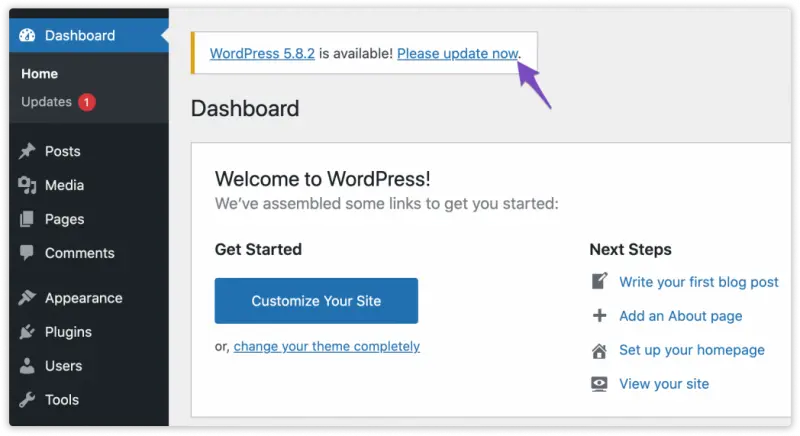
To check for updates manually, go to Dashboard → Updates.

On the WordPress Updates page, click Update Now and wait for the update to complete.

Gravity Forms Updates and Recommendations
Keeping Gravity Forms updated to its latest version is essential for getting the most out of the plugin and ensuring it performs reliably. It also plays a key role in keeping your website secure — outdated plugins, including Gravity Forms, are more vulnerable to security risks, which makes regular updates important.
If your Gravity Forms plugin isn’t up to date, we recommend updating it before setting up GSheetConnector.
The good news is that updating Gravity Forms is just as straightforward — it only takes a few clicks from the wp-admin panel.
 CF7 Google Sheet Connector
 WPForms Google Sheet Connector
 Ninja Forms Google Sheet Connector
 Gravity Forms Google Sheet Connector
 Formidable Forms Google Sheet Connector
 Forminator Forms Google Sheet Connector
 Fluent Forms Google Sheet Connector
 JetFormBuilder Google Sheet Connector
 Elementor Forms Google Sheet Connector
 Avada Forms Google Sheet Connector
 Divi Forms Google Sheet Connector
 WooCommerce Google Sheet Connector
 Easy Digital Downloads Google Sheet Connector
 WordPress Core Google Sheet Connector


