
Prior to configuring the JetFormBuilder Google Sheet Connector, it’s advisable to verify whether your server is compatible with GSheetConnector or not. most websites typically do not encounter compatibility issues with GSheetConnector, it’s always better to take precautionary measures.
- The lowest PHP version supported by GSheetConnector is 7.4, the most recent stable PHP version is recommended.
- GSheetConnector supports WordPress 6.3.1 and upcoming versions and recommends updating to the latest version.
- It’s highly recommended to use the latest version of JetFormBuilder.
- GSheetConnector needs some PHP modules installed on your server to add extra abilities.
- HTTPS must be configured.
- cURL must be enabled.
- If your website uses other Google API versions, it’s recommended to deactivate those plugins, as some plugins use an older version of GuzzleHTTP, which may create conflicts.
- Updated and Released Version : v2.12.6
- Guzzle HTTP Version : Upgraded to Guzzle 7.4.3
PHP Version
GSheetConnector requires a reasonably up-to-date version of PHP to operate effectively. It doesn’t necessarily need to be the absolute latest release, but using a significantly outdated version will not suffice.
The lowest supported PHP version is now 7.4. Even WordPress themselves recommends that you use PHP 7.4 at least.

You can even find a notification inside your WordPress dashboard recommending you to update PHP.

The reasons we are asking you to update rather than support an older version are many.
At first, older PHP versions are no longer supported by the PHP development team. They no longer receive security fixes or performance improvements. If you’re still using an outdated PHP version, it’s time to update.
Later versions of PHP are more secure and can run faster. They are designed for high performance, even under heavy traffic loads. Upgrading to a stable PHP version can significantly improve your website’s performance.
To fix: If you don’t know how to update PHP, the easiest solution is to contact your hosting provider.
WordPress Version
Keeping your WordPress installation up-to-date allows you to enjoy the latest plugins and performance optimizations. It’s also extremely important for your website’s security. Outdated WordPress sites are vulnerable to security risks, so make sure you update your site regularly.
If you have an out-of-date WordPress version, you’ll need to update it before continuing with the GSheetConnector setup, as the lowest version we support is 5.6. However, we recommend using the latest version of WordPress.
Fortunately, updating WordPress through the wp-admin dashboard is quick and easy.
To fix: Whenever a new WordPress update is available, simply click Please update now from your dashboard to begin the update process.
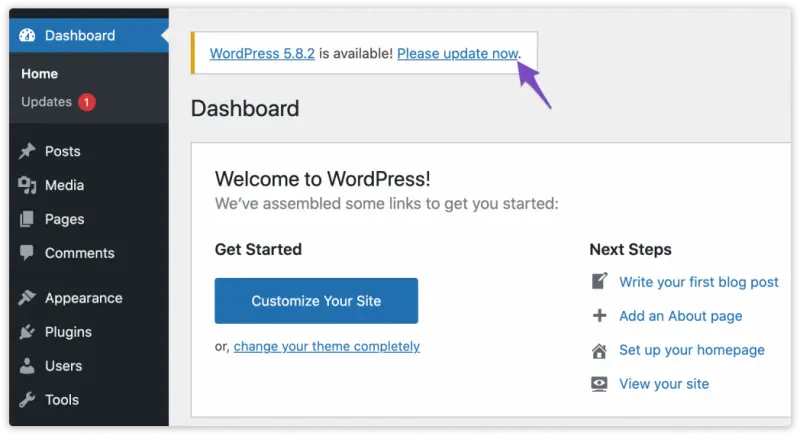
If you want to check for updates manually, navigate to Dashboard → Updates.

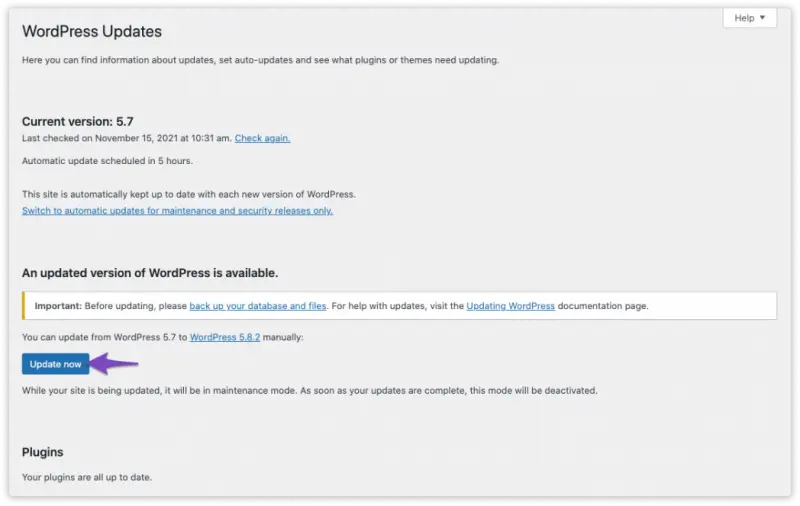
On the WordPress Updates page, click the Update Now button and wait until the update process is completed.
JetFormBuilder
Maintaining the latest version of JetFormBuilder is essential for ensuring compatibility, optimal performance, and access to the latest features. Regular updates also help keep your website secure and protected from known vulnerabilities.
If your JetFormBuilder plugin is not up to date, it’s recommended to update it before proceeding with the setup of GSheetConnector.
The good news is that updating JetFormBuilder is a simple process through the WordPress wp-admin dashboard.


